Focus management
The Focus Manager (SmartFocusManager) component coordinates the active menu scope. The Focus Scope (SmartFocusScope) component defines which descendant Selectable controls belong to that menu and optionally remembers the last valid selection.
Focus target precedence
When a scope needs focus, its target is resolved in this order:
A valid target must belong to the active scope and be active, enabled, and interactable. An invalid remembered or default selection is skipped.
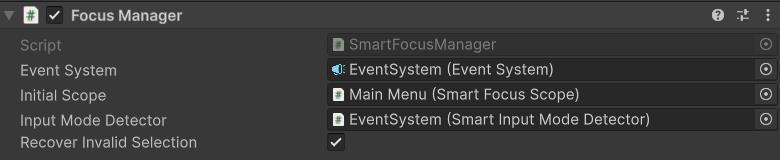
Focus Manager
Configure these Inspector fields:
- Event System: the managed EventSystem. If empty, the manager resolves
EventSystem.current. - Initial Scope: the scope focused when the manager starts.
- Input Mode Detector: optional mode source used to pause automatic recovery during mouse-driven interaction. The manager supplies its assigned EventSystem to the detector.
- Recover Invalid Selection: restores a valid focus target when the current selection becomes invalid.
The main runtime operations are:
SetScope(scope)changes the active scope and resolves focus immediately.RequestFocus(selectable)selects a specific valid control in the current scope.RecoverFocus()resolves the normal remembered/default/fallback sequence on demand.PushModal(scope)andPopModal()manage modal focus restoration.
SetScope(null) stops scope monitoring without changing the current EventSystem selection. Every SetScope call also clears pending modal restoration history; use PushModal and PopModal for modal flows.
Focus Scope
Set Default Selection to the control that should receive focus when the scope has no valid memory. Remember Last Selection is enabled by default. Disable it when every entry should start from the default or first valid descendant.

Call ClearRememberedSelection() to discard stored selection explicitly:
The remembered object is used only while it remains a valid descendant of the scope.
Invalid-selection recovery
While a scope is active, the manager observes the EventSystem selection. With recovery enabled, it can replace a selection that is:
- missing;
- outside the current scope;
- on an inactive GameObject;
- on a disabled
Selectable; or - non-interactable.
When an active Input Mode Detector (SmartInputModeDetector) is assigned, automatic recovery pauses in Mouse mode. The manager supplies its EventSystem to the detector, which observes the UI module's actions in Auto mode; the manager, not the detector, performs focus recovery. Keyboard or gamepad UI activity can restore valid focus when needed. Without an active detector, recovery remains enabled regardless of pointer activity.