Rocket Rumble 3D
An optional 2–4-player XZ combat sample for Couch Co-op Builder, Unity 6.3 LTS, URP and Input System. It demonstrates selected-character spawning, isolated actions, profile rebinding, persistent sessions and optional individual cameras. Movement, combat, score and follow behavior are sample-owned; see Player scope for framework capacity.
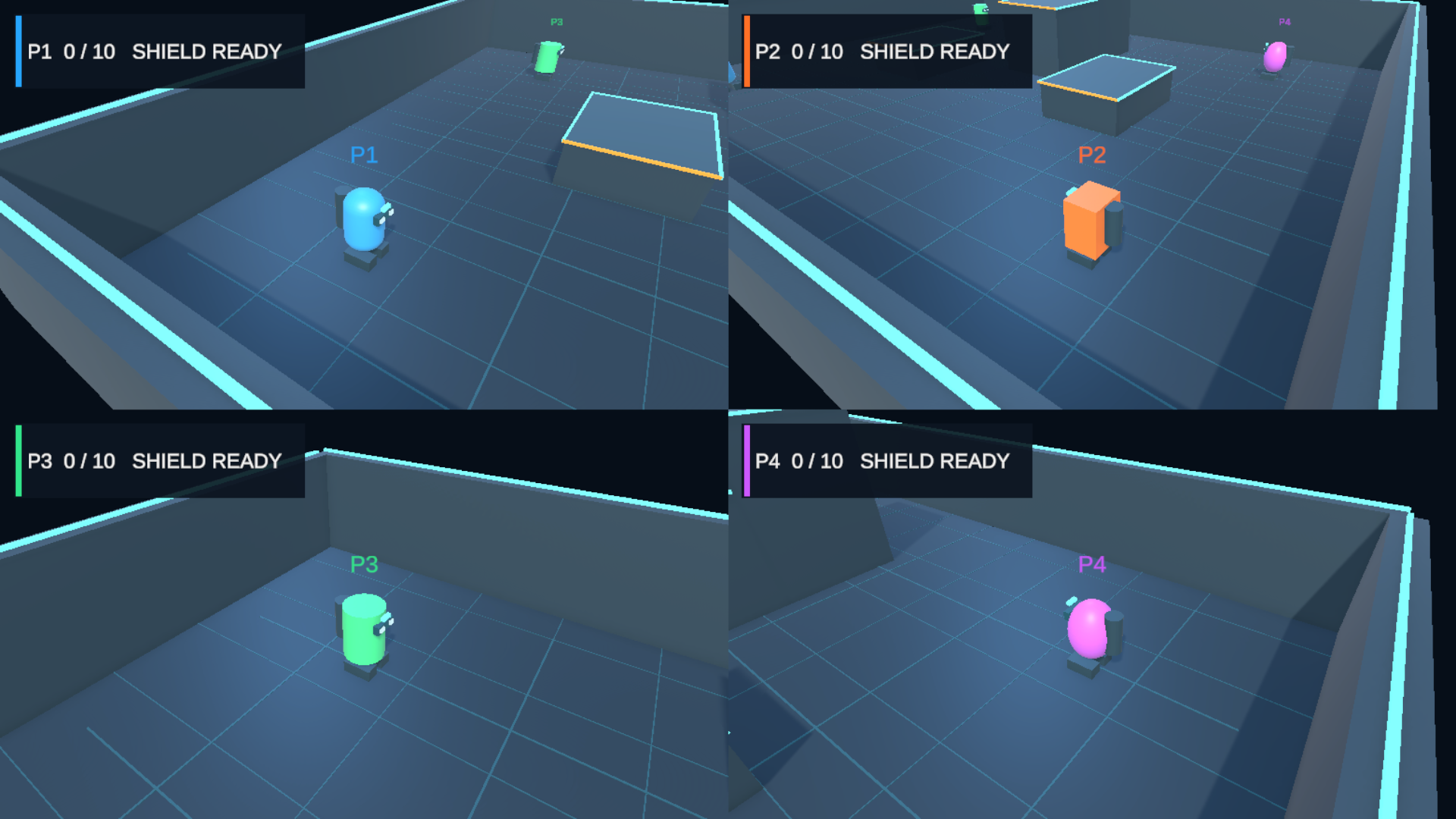
Figure 5. Rocket Rumble 3D: four assigned views with per-player HUDs. Pause and settings remain global overlays.
Open and play
Open RocketRumble3DMainMenu (Assets/LevelArgento/CouchCoopBuilder/Samples/RocketRumble3D/Scenes/RocketRumble3DMainMenu.unity), enter Play Mode and choose PLAY. Join/confirm at least two players, then activate START GAME. First register its three scenes using Configure Supplied Samples. The supplied catalog has Cobalt, Ember, Mint and Orchid, with separate 3D gameplay and preview prefabs. Customize your own copies; keep RocketRumbleShared.
Shared Rocket Rumble guidance explains Audio/Controls settings, Pause, Device Lost, Drop Out/Rejoin and scene returns. Gameplay rebinding leaves lobby/menu controls unchanged.
Gameplay controls
| Source | Move | Jump | Fire | Shield | Pause / winner return |
|---|---|---|---|---|---|
| Keyboard A | WASD | Space | F | Left Shift | T |
| Keyboard B | Arrows | Numpad 0 | Enter | Right Shift | Y |
| Gamepad | Left stick | North | South | Left Trigger | Start |
| Supplied DragonRise profile | Profile stick | button3 | button2 | button1 | button11 |
Join/Leave defaults are Q/G, P/Backspace, Start/Select and DragonRise button11/button12. Controls exposes all four keyboard Move directions, Jump, Fire, Shield and Pause / Winner Return; controller rows use vector Move. The sample consumes the framework's profile identity/conflict/reset/storage APIs, described in Input Binding Profiles.
Arena, movement and jump
The arena has a 26×22 floor, boundaries, low/middle/high platforms, four indexed initial spawns and twelve safe respawn points. Move projects the shared camera's forward/right onto XZ, clamps diagonal speed to six units/second and retains facing when stopped. Move.y means forward/backward, never Jump.
Jump uses an independent grounded press at velocity 9.3. Per-player airborne acceleration is 2.2 times gravity rising / 3.2 falling; project gravity is unchanged. Approximate floor-jump height is 1.91 units, peak time 0.40 seconds and landing time 0.76 seconds. The 1.2-unit platforms are reachable; 2.8/4.2-unit platforms need intermediate traversal. Grounding accepts floor/platform normals, not side walls. Holding Jump through landing does not repeat it.
Rigidbody/Collider 3D physics, interpolated movement and frozen physical rotation keep presentation facing separate. Player capsules ignore one another; other collisions remain enabled. Rockets ignore their owner, travel horizontally at 20 units/second, expire after three seconds and consume once on hit/block/environment collision. They do not aim, home, splash or arc.
Shield, respawn and match
A frontal incoming rocket spends the held Shield without death/score and starts its five-second cooldown; rear/outgoing rockets bypass protection. Raising it leaves movement/fire available; release without a block costs nothing. Death/respawn resets Shield and requires fresh input. HUD shows identity, score, respawn and Shield state.
One unblocked opponent hit awards one attacker point. Ordinary death respawns the same object/context/InputUser after five seconds, retaining selection and score. Twelve authored points use XZ opponent distance: prefer at least six units separation, avoid the previous point when possible, otherwise maximize nearest-opponent separation. Falling below Y=-10 is unscored.
The 3 → 2 → 1 → GO! countdown blocks gameplay. Default first to 10 kills wins; victory freezes gameplay and clears rockets. Any available joined player's Pause shortcut or pointer Return button returns to the originating 3D lobby. Ready and the next match's score reset. Reversible Drop Out releases/recreates the representation while retaining score; Device Lost keeps it. See shared lifecycle guidance.
Integration to study
Read the sample's GameplayPlayerSetup (Spawn Selected Character + Explicit Spawn Points), GameplayPlayerBinding (Built-in Actions), 3D player/projectile controllers, match/respawn/HUD components and camera settings integration. The framework owns sessions/users/isolated actions; the game owns combat, scoring, respawn, camera movement and presentation. Shared menus and settings supplies the common authored UI, input profiles and included sample audio.
This game has four authored slots. For an independent 1–8-player camera example, use Split Screen Playgrounds. Neither sample promises camera collision/framing or performance for arbitrary customer levels.
Try your integration
Join Q/P, confirm and move to Start without clearing Ready. Test independent XZ move/jump/fire/shield, safe respawn and winner return. Use Controls to change a gameplay action while lobby Confirm remains unchanged. Test Pause/Resume, Drop Out/Rejoin and actual Device Lost separately. For cameras, navigate Pause → Camera Settings without mouse; toggle Shared/Split, change 2P/3P layouts, Back and reopen. Repeat with supported controllers and check Console on scene exit.
Optional Split Screen cameras
The saved Arena scene includes a GameplayCameraManager with the authored shared camera, an authored player-camera prefab, built-in layouts and the default single AudioListener policy. Split Screen defaults OFF. OFF keeps the original shared 47-degree view and full four-player HUD. ON creates one assigned follow camera per active representation (one to four), plus a compact P#/score/Shield card in each view. Countdown, Pause and Winner remain full-screen overlays.
The follow camera uses GameplayCameraAssignment and its matching GameplayPlayerBinding. It tracks position with a fixed heading inherited from the shared camera, not player facing. Gameplay movement continues to use the shared camera's orientation even while that camera is disabled for rendering. Wide horizontal views use a modestly narrower field of view and lateral arena bias so players stay visible near the edge. There is no orbit, aim camera or collision rig.
During a match, press Pause, navigate to CAMERA SETTINGS using Up/Down, and press Confirm/Submit to open it. Mouse users can click CAMERA SETTINGS on the Pause Card. Focus starts on Split Screen with the menu's orange selection accent. Up/Down selects Split Screen, the visible layout rows, Reset Defaults or Back; Left/Right changes the selected option (or selects a footer button). Confirm activates the focused control. Escape for keyboard roles or the owned controller Back action returns to the Pause menu, as does Back. The authored buttons also support pointer clicks. Resume, Lobby and Main Menu keep their existing pause behavior. Changes apply immediately, including while time is frozen. The 2-player choices are Vertical and Horizontal; the four 3-player choices are Top 2 / Bottom 1, Bottom 2 / Top 1, Left 1 / Right 2, and Right 1 / Left 2. Four players use the framework's 2x2 grid.
Rocket Rumble 3D alone saves these choices under RocketRumble3D.Camera.* using a replaceable IRocketRumble3DCameraPreferences adapter backed by PlayerPrefs. Reset Defaults restores OFF, Vertical and Top 2 / Bottom 1. Camera preferences are sample settings, separate from input binding profiles and the generic camera API. To customize the integration, edit the saved GameplayCameraManager, player-camera prefab and Camera Settings controls in your own copy of the sample.
A camera follows a respawned player without changing its session or owned input. Device loss retains the assigned view while Pause waits for recovery. Intentional Drop Out removes the view; the remaining cameras retile without changing their P# identities. Rejoin restores the reserved view. Returning to Lobby releases all scene-local player cameras. Camera rect layouts are deterministic; the sample does not add dynamic Split Screen transitions or camera collision.